
Researchers

Brainiac is not an artificial neural network. Rather, by simulating actual voltages on each neuron and synapse at every point in time, it allows you to do research on how brains actually function, including how they create memories and learn. Plus, Brainiac makes it easy for you to see and understand what’s happening.
It’s Free
Brainiac is Open Source: Its code, its library of brains, everything is free without fee for you to download, run, modify, and even redistribute derivative works.
Because it’s Open Source, you get full control of the software (written entirely in Python), and you can easily customize it to serve your specific needs.
It’s also easy to share Brainiac brains—and to share your learning algorithms—with fellow researchers, for instance, as a way to corroborate results.
Powerful Visualization
Brainiac provides a visual way to make understanding the brain and its vast connections much easier, thanks to its powerful, yet easy-to-use graphic user interface (GUI). A picture truly is “worth a thousand words.”
With Brainiac, you can see all the neurons, see which ones are firing, and click an individual neuron to understand what made it fire (or not).
The GUI color-codes neurons based on firing frequency, and the simulation can be single-stepped, started, paused, and rewound to any point in time.
Clicking a neuron will show its pre- and post-synapses as lines connecting to pre- and post-neurons (Image 1). These inhibitory or excitatory synapse lines are shown as red and yellow, respectively, and their weight is represented by the line width.
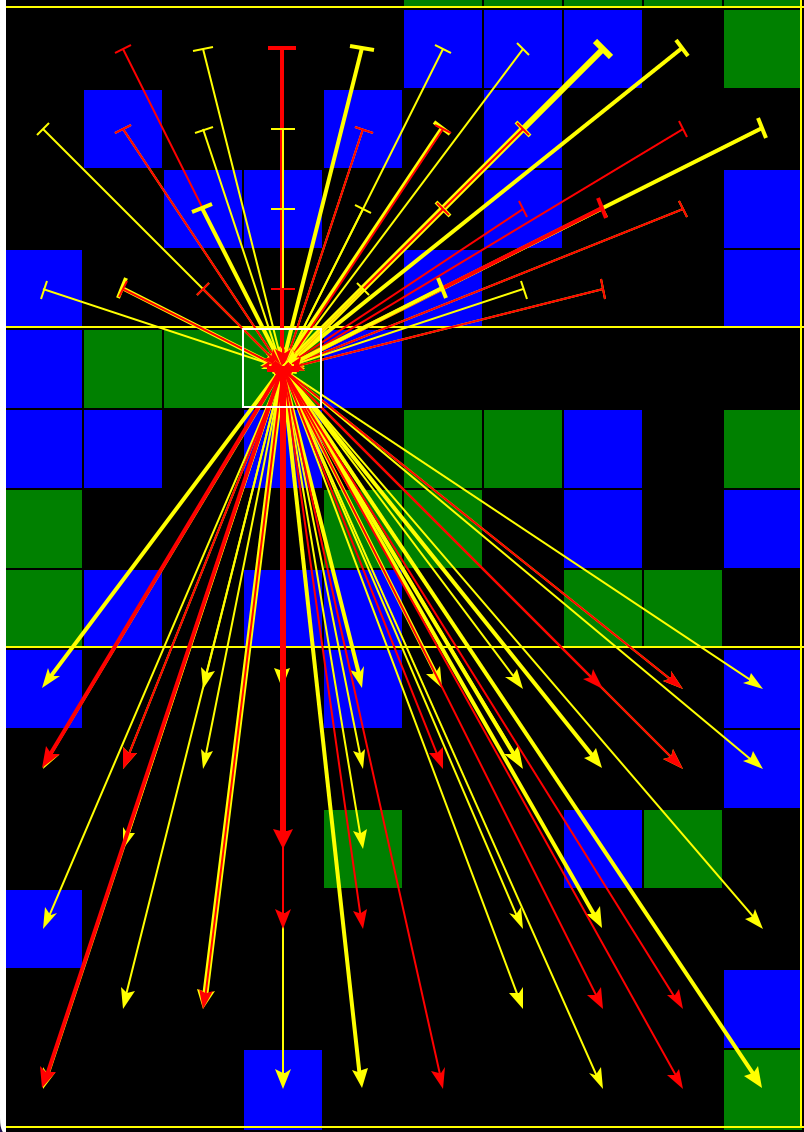
Image 1: Selected neuron’s pre- and post- synapses
Feedback paths, where two neurons have post-synapses to each other, are very important in creating memories and associations, so Brainiac has a simple, uncluttered way to visualize these. When clicking a neuron to show feedback paths, Brainiac reduces the two synapse lines of each feedback path to a single line (Image 2), with inhibitory lines colored red and excitatory shown in white, and their weight is represented by the line width.
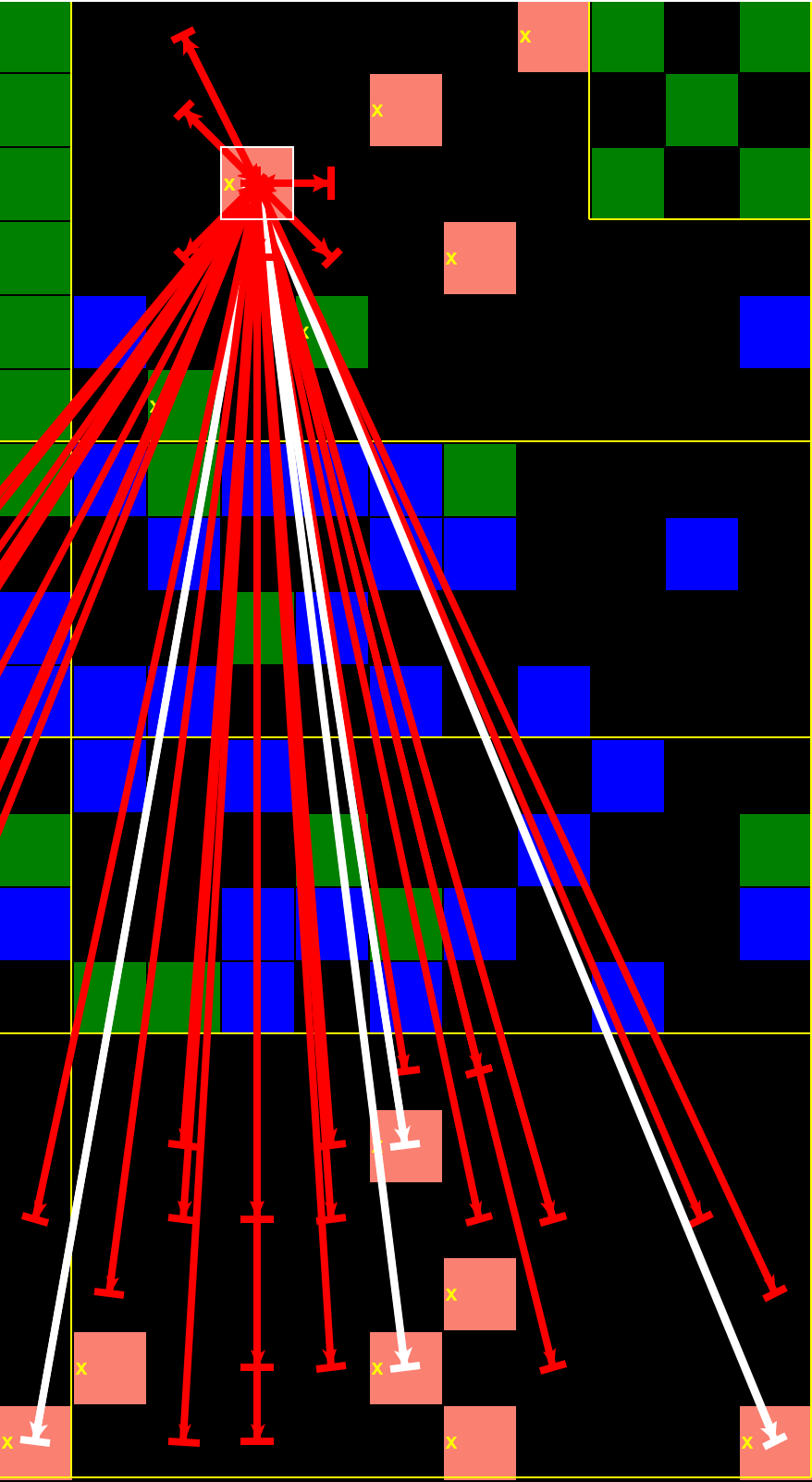
Image 2: Selected neuron’s feedback paths
You can plot the voltage potential of a neuron over time (Image 3), along with its pre-synaptic neurons. (A neuron’s potential is plotted as the maximum of its soma and axon potentials.)
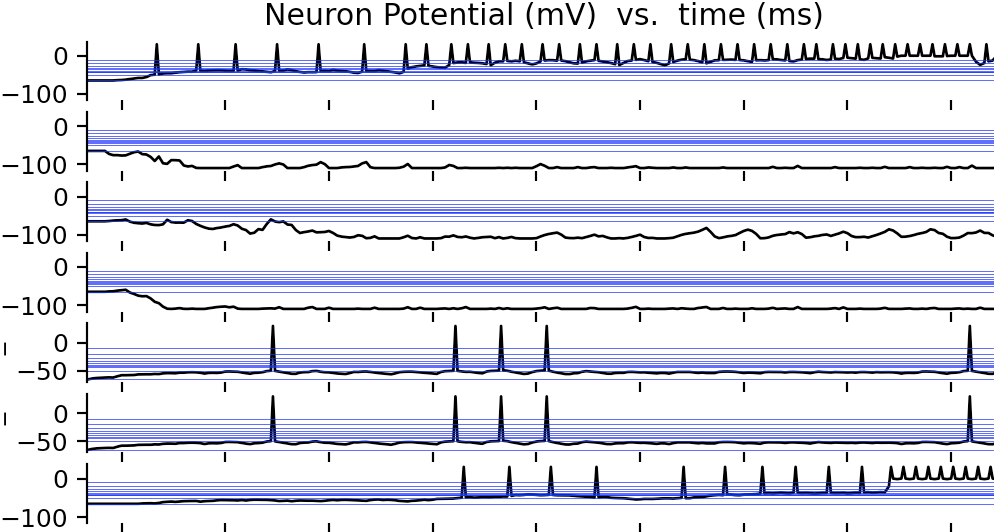
Image 3: Potential plot of selected neuron and its pre-synaptic neurons
The floorplan view (Image 4) color-codes neurons by region, and it displays the synapse profiles (i.e., where the post-synapses of a region are going). This simplified “meta view” of the connectivity of the brain is indispensable for making sense of millions of synapses. For Example, Image 4 shows only 10 lines and 3 circles to represent over 19,000 synapses.
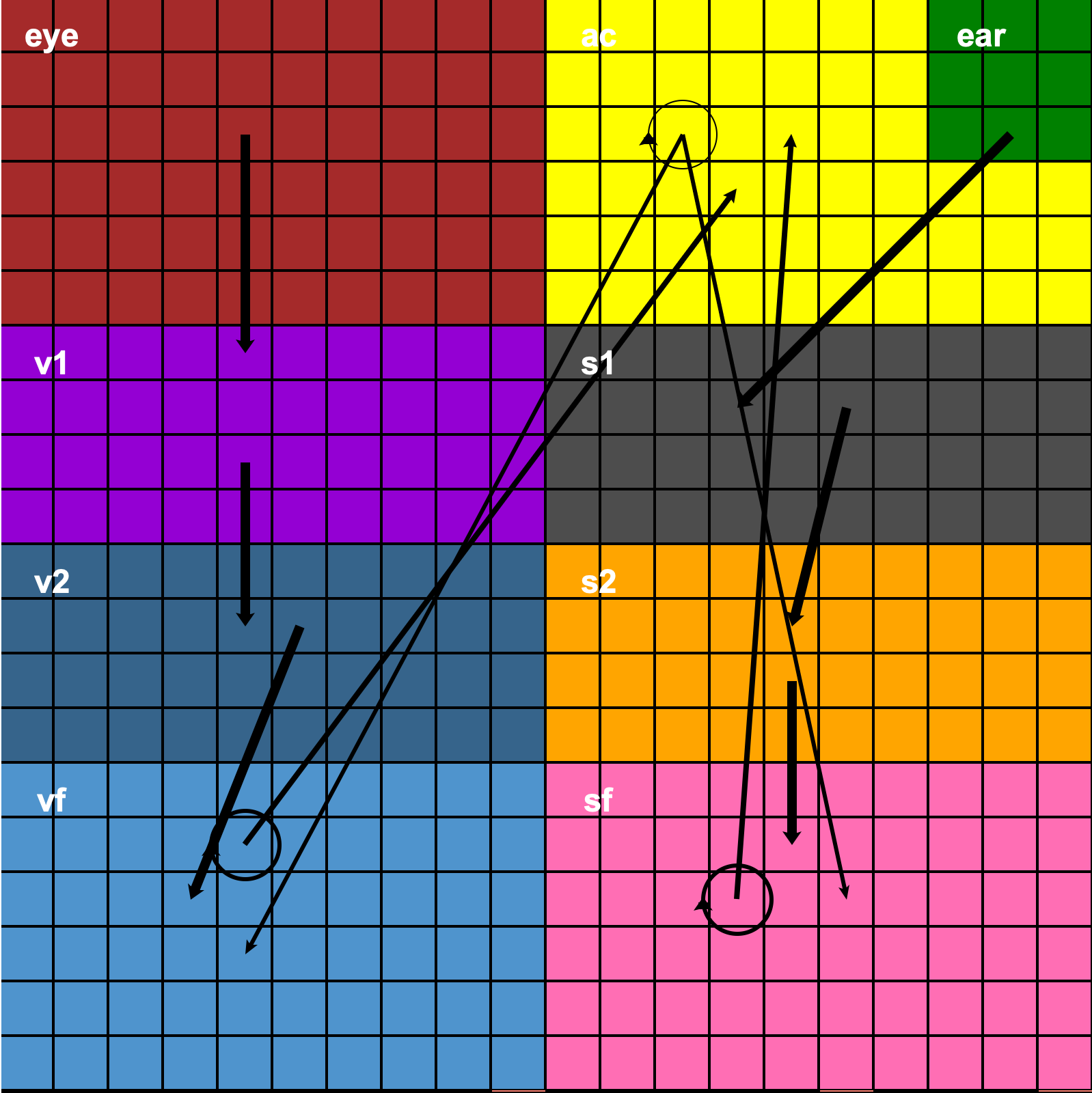
Image 4: Floorplan View
You also can set up custom messages, or shapes, to visually display directly over a neuron (or region) when the conditions you’re looking for are met. (Click the Sudoku Brain simulation video, video 1, for an example of how the GUI allows clear visualization of the boxes and their numbers.)
Powerful Brain-Specification Language
Brainiac has a high-level language so, for example, 70 lines of Python code is able to specify how millions of synapses connect with hundreds of thousands of neurons to form a brain.
Surprisingly, Brainiac’s high-level language also gives you tremendous control over synapse connections: You can specify very detailed post-synaptic profiles and assign one to many neurons.
You’re also able to specify brain regions, as well as which types of neurons and post-synapse profiles live there.
Because a brain need inputs, Brainiac includes a library of input sensors (eyes, ears, etc.) that you can use as-is or modify, and you also can create new sensors.
Brainiac is highly parameterized to give you extreme control. For example, you can modify the action-potential waveform just by changing a variable (holding an array of potentials), without changing the code.
Easy to Code & Test Your Learning Algorithm
Brainiac provides an Application Program Interface (API) for you to code an algorithm that specifies exactly which synapses in your Brainiac brain will change as it learns. At the end of each time step, the simulator will call your algorithm, which will modify, weight, delete, and/or add synapses.
Brainiac also includes a rich library of search routines to help identify specific neurons or synapses that meet your criteria for modifying. These search routines drastically reduce the number of lines of code for the learning algorithm. For example, only 44 lines of code were required in the algorithm to learn associations (click video 2 to see the simulation replay).
Brainiac Brains Are Storable and Loadable
After learning, Brainiac can store the entire state of the your Brainiac brain (neurons, synapses, weighting, etc.). This brain can be reloaded later, in a new Brainiac session, to resume and accumulate more learning.
You can even add new classes—or new attributes to any class—and it will load and store those new values automatically (without modification of the load/store routines).
Visual Interface Help for Data Structures
You can easily understand the underlying data structures that form the brain by using the GUI’s class Instance Browser (Image 5), which allows you to interactively browse through any instance of the entire data structure (attributes and values). This simple interface is extremely valuable when learning what a Brainiac brain is. All blue text is clickable, including instance attribute names, which can be clicked to see their documentation.
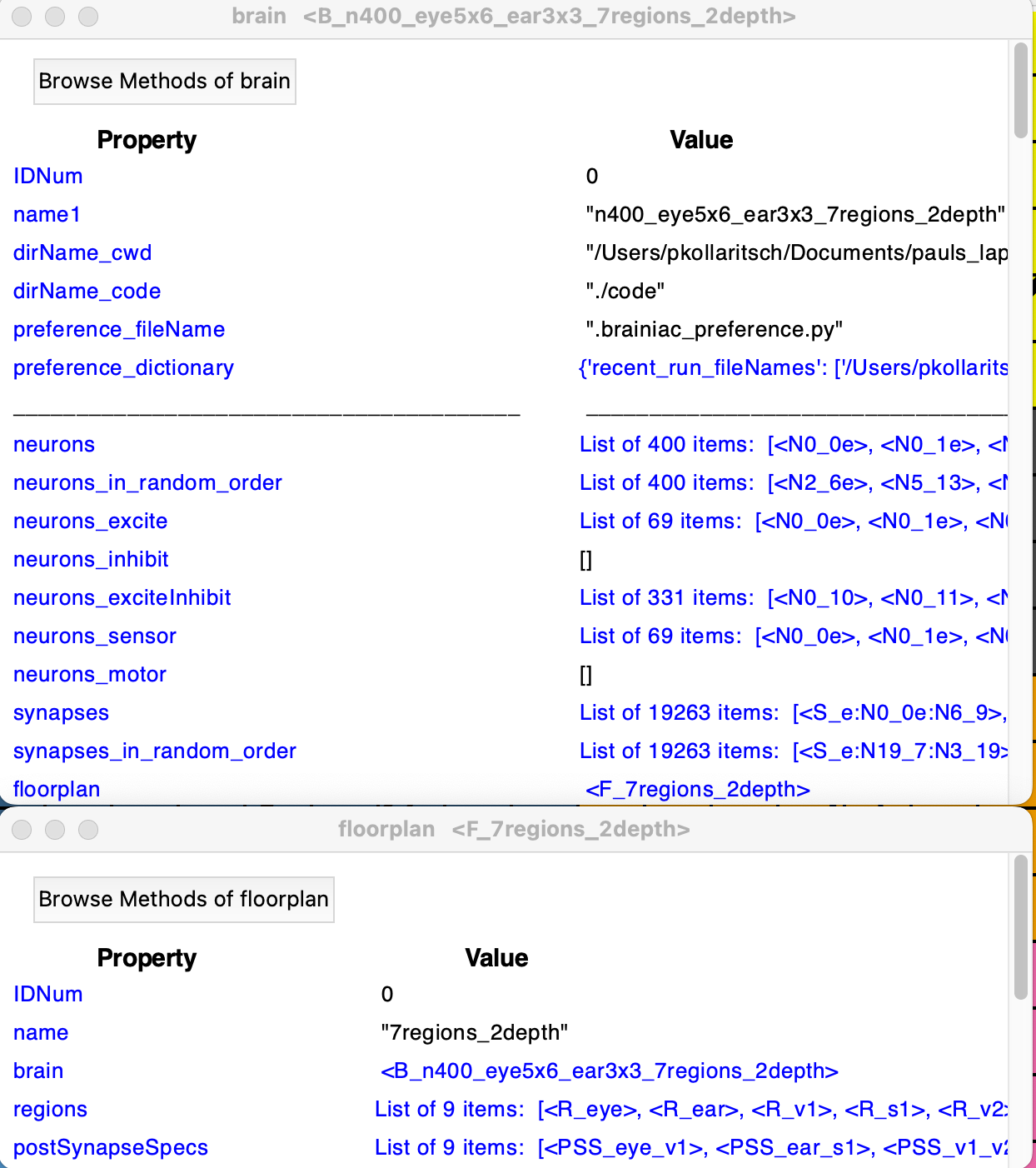
Image 5: Instance Browser
To find all routines and their documentation, Brainiac’s GUI also has a Method Browser (Image 6) to interactively bring up the documentation for any method of any class and its arguments.
Add new classes, methods, or attributes in existing classes and add their documentation, and the Instance and Method Browsers will handle them automatically without additional coding from you.
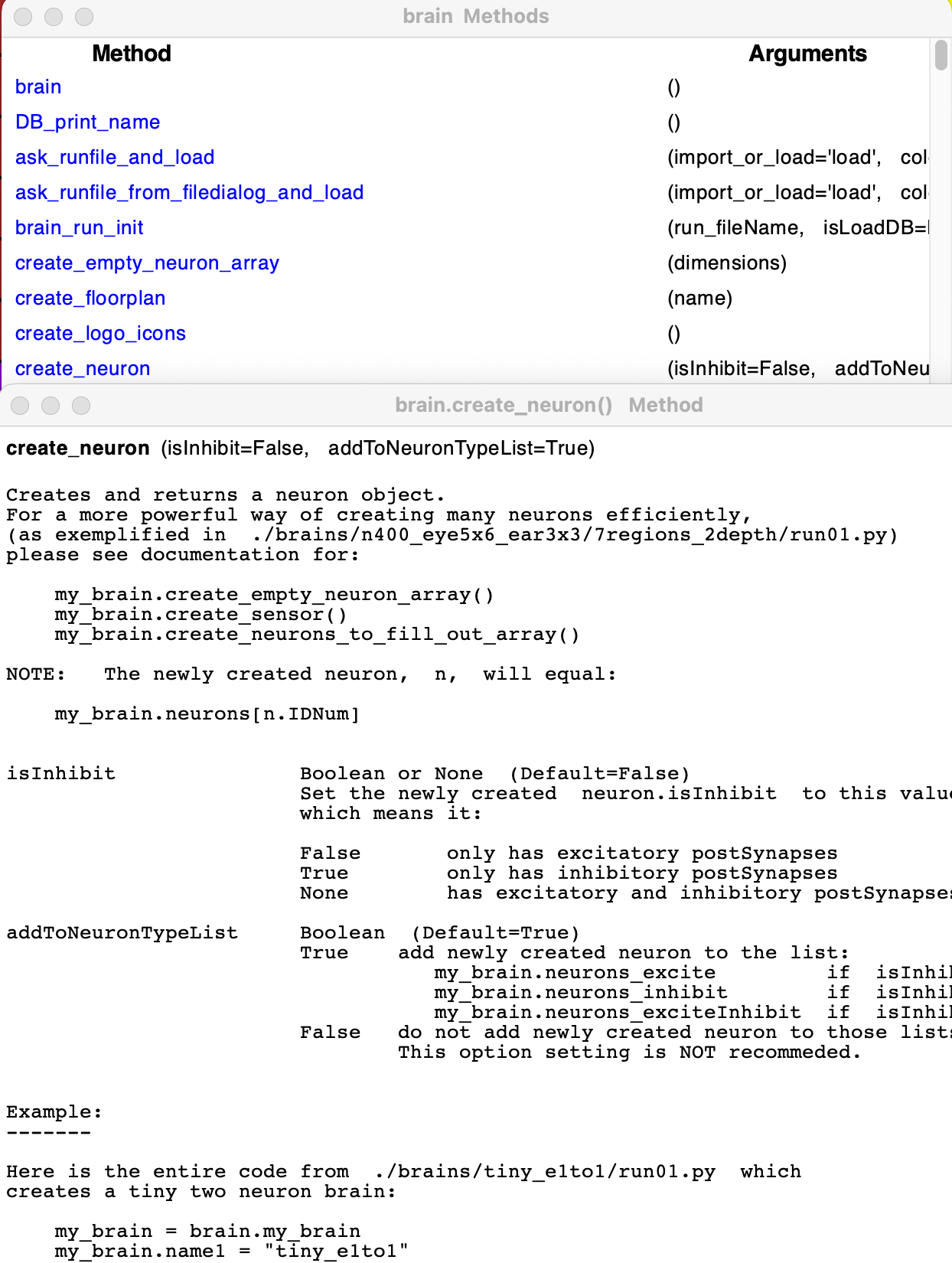
Image 6: Method Browser
Brainiac has an API command line window for accepting any Python code. This allows for easy debugging of your new code or typing in a Brainiac command (for instance, to save the current Brainiac brain).
This video is a replay of the Brainiac GUI simulating a 400-neuron, 19,263-synapse Brainiac brain with an eye and an ear that is learning to associate the sound “X” with the written letter “X.” Once this brain has learned the association, if it hears an X but doesn’t see one, the visual X neuron will still fire because the brain is recalling the association.
This video shows a Brainiac brain that knows how to play Sudoku. It has 3,600 neurons and 78,732 synapses. The user interface has been color-coded to indicate neurons firing at high frequency in orange, at medium frequency in green, at low frequency in blue, and neurons that are not firing in black. The white numbers were already provided as clues in this Sudoku puzzle, and the yellow numbers are guesses by the brain as it figures out the solution.